Switcher Studio Deal 2026 – 15% OFF Pro Plans Offer

Written By:
Pradeep Singh
Last Updated: June 7, 2026
Disclosure: This post may contain affiliate links, meaning if you decide to make a purchase via my links, I may earn a commission at no additional cost to you. See my disclosure for more info.
Switcher Studio is a multicamera live streaming app that runs on the Apple devices you already carry. We have partnered with Switcher Studio to bring you 15% OFF any plan when you enter the code STARTGROUND at checkout through our partner link.
| Switcher Studio Deal | Offer | How to Claim |
|---|---|---|
| WPism Exclusive | 15% OFF any Switcher Studio plan | Code STARTGROUND + partner link |
| Free Trial | 14 days on Mac or iOS | Partner link |
Below, I walk you through how to redeem the code, what each plan costs, the features that matter most, and how Switcher holds up against the other streaming tools you have probably been comparing.
How to Redeem Switcher Studio Promo Code?
Redeeming the offer is quick, and you will not need to touch a single piece of dedicated hardware to get started. Here is the exact sequence I recommend.
Step 1: Click our exclusive partner link – This carries your discount through to the Switcher Studio sign-up flow.
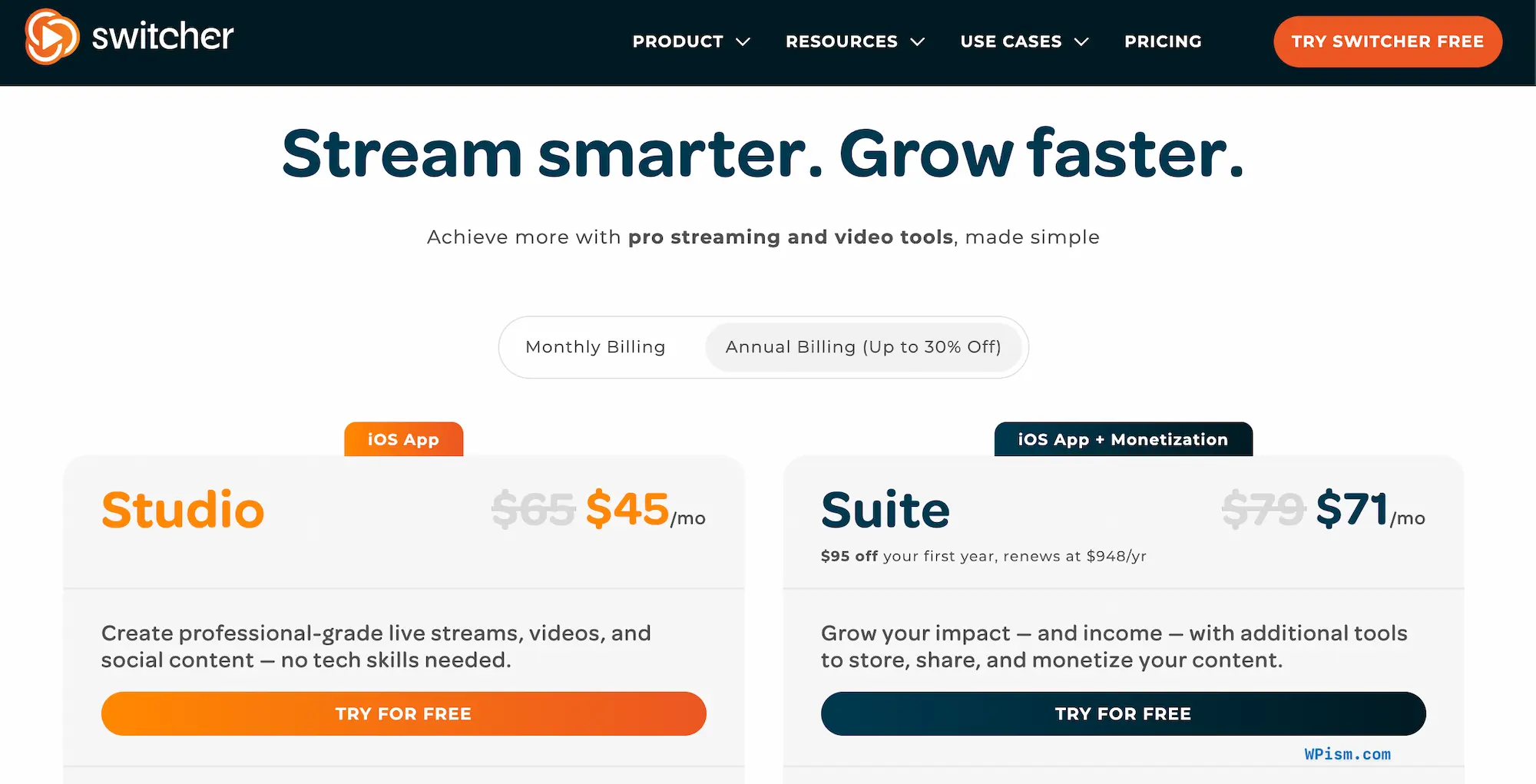
Step 2: Pick your plan and billing cycle – Decide between Studio and Suite, and toggle monthly or annual depending on how long you plan to stream.
Step 3: Enter the code STARTGROUND – Drop the code into the promo field at checkout so the 15% reduction attaches to your subscription.
Step 4: Download the app and start your trial – Install Switcher on your Mac, iPhone, or iPad and begin your 14-day free trial.
By following these steps, you can activate the Switcher Studio promo code and start producing multicamera streams the same day.
Switcher Studio Pricing and Plans
Switcher Studio keeps its lineup to two clear tiers, and the WPism code reduces whichever one you land on. The split is straightforward: one plan handles production, the other adds hosting and the ability to make money from your video. Annual billing already lowers the monthly rate before the discount, so the cheapest route is annual billing paired with the code.
| Plan | Monthly | Annual (per month) | Storage | Best For |
|---|---|---|---|---|
| Studio | $65/mo | $45/mo | 250 cloud assets | Creators and small teams who mainly stream |
| Suite | $99/mo | $71/mo | 1,000 cloud assets | Organizations that host, embed, and sell content |
Studio
Studio is where most people begin, and for good reason. You get the full production engine: multicamera capture, real-time editing, branded graphics, the social clip creator, video analytics, and donation collection. It multistreams to two destinations at once, which covers the typical “live on YouTube and Facebook simultaneously” scenario without forcing an upgrade. I would point a solo creator or a lean two-person crew straight here.
Suite
Suite is the tier I recommend once your video becomes a revenue stream rather than just an output. It carries everything in Studio, then expands multistreaming to twenty destinations, bumps hosting to 100 videos, and unlocks the parts that actually generate income — ticketed live events, pay-to-view content, and subscriptions. You also get embeddable players and custom watch pages, so your content lives on your own site instead of someone else’s platform. The annual route is the sensible pick here, since the monetization tools pay for themselves faster when you commit for the year.
Switcher Studio Features
Switcher Studio sits in an unusual spot in the streaming market. Most professional production tools assume you own a Windows tower, capture cards, and standalone cameras. Switcher assumes the opposite — that you already own an iPhone, maybe an iPad, perhaps a Mac, and that those devices are more than capable of running a broadcast. That assumption is what turned it into a staple for churches, sports programs, educators, and creators who need quality without a equipment loan.
What you are paying for is consolidation. One subscription folds switching, editing, branding, engagement, recording, and selling into a single app, replacing four or five separate tools that would each bill you monthly.
Up to Nine Synced Cameras
You can connect and switch between as many as nine angles at once, pulling from iPhones, iPads, Android phones, NDI feeds, and HDMI inputs. The switching happens live with a tap, so one operator can run coverage that traditionally needed a small crew behind a console. This is the headline feature, and it is the one users mention first when they explain why they stayed.
Live Editing and Layouts
Picture-in-picture, split-screen, multiview, and screen sharing are all available mid-broadcast. You compose each shot as the moment happens rather than fixing it afterward, which is exactly what makes Switcher viable for unpredictable, fast-moving events.
Multistreaming and Custom RTMP
Switcher pushes a single broadcast out to Facebook, YouTube, Instagram, TikTok, X, and LinkedIn at the same time. Studio covers two destinations and Suite covers twenty, and custom RTMP connections let you hit any platform outside the built-in list. You are never locked into a fixed roster of destinations.
Brand Profiles and Graphic Templates
You apply your logos, colors, and fonts once, save it as a reusable brand profile, and every future stream inherits the look automatically. The graphic templates handle lower-thirds, scoreboards, text overlays, and images in seconds. For a sports team running weekly games, the scoreboard overlay alone saves real production time.
Audience Engagement Tools
Comments from Facebook and YouTube arrive in one unified feed, so you respond to your community without flipping between browser tabs. Remote guests join through picture-in-picture with screen sharing, turning a solo broadcast into a proper interview format, and live polling keeps viewers participating instead of drifting away.
Recording and the Clip Creator
Every session can save automatically through recording-only mode, local recordings, or cloud recordings. The built-in social clip creator then slices that footage into ready-to-post segments. I find this the most underrated feature — one live event can supply a full week of short-form content without you ever opening a separate editor.
Hosting and Monetization
On Suite, Switcher becomes a destination as well as a tool. You embed streams and videos on your own site, build a branded, ad-free watch page with no competitor recommendations, and run a video library that behaves like a personal Netflix catalog. The monetization layer covers ticketed events, pay-to-view videos, subscriptions, and donations through PayPal, Givelify, or Tithe.ly. Switcher takes no percentage of your sales and charges a flat per-transaction fee instead, which means you keep far more of your revenue than platforms that skim a cut off every sale.
All Switcher Studio Deals and Offers
Through the WPism partnership, there is one active Switcher Studio offer right now, and it applies across the full plan range.
Current WPism Exclusive Offer
Enter the code STARTGROUND with our partner link to take 15% off any Switcher Studio subscription. The discount works on both Studio and Suite, on monthly or annual billing, giving you the freedom to match the saving to your setup rather than being funnelled into one plan. New subscribers keep the standard 14-day free trial, so you can run a complete production before your first charge.
Eligibility
The offer is open to new Switcher Studio subscribers who sign up through the WPism partner link and apply the code at checkout. You will need at least one Apple device — a Mac, iPhone, or iPad — to run the platform, with Android and HDMI sources usable as additional camera angles once you are set up.
Switcher Studio Reviews
Switcher Studio has built a loyal following over the years, and the review consensus is consistently warm. It shows up most in the worship, sports, education, and creator communities — anywhere a small team needs broadcast polish on a realistic budget.
What Users Appreciate Most
The praise nearly always circles back to value. Reviewers describe transforming everyday iPhones and iPads into a setup that would otherwise demand thousands in broadcast equipment. One reviewer noted using the app for a decade and still ranking it as their single favorite tool for recording and streaming, which is the kind of retention most software never earns.
Where Switcher Performs Well
Production quality and social reach come up again and again. One user credited a near tenfold jump in views after moving their weekly Facebook Lives onto Switcher. The graphics built directly into the app, combined with the ability to blend feeds from iPhones, Macs, and remote contributors, make it a genuine all-in-one studio rather than a one-trick streaming app.
Common Points of Feedback
The honest criticism is twofold. The price can land hard at first glance, and several reviewers admit to that initial reaction before deciding the feature depth justifies it. A few users also wish for native PC webcam input, which Switcher does not offer given its Apple-first design. Neither point pushes people away — they read as wish-list items rather than regrets.
Overall Sentiment
In my reading of the feedback, sentiment skews firmly positive. The standout signal is longevity: users stay for years, and the recurring verdict is that the output quality and the hours saved comfortably outweigh the subscription cost once you have your workflow dialed in.
Switcher Studio
Switcher Studio is a mobile multicamera live streaming platform for Mac and iOS that lets you produce, edit, brand, host, and monetize professional live video using devices you already own.
Price: 45
Price Currency: USD
Application Category: MultimediaApplication
5
Pros
- Turns iPhones and iPads into a studio.
- Switches up to nine live camera angles.
- Keeps revenue with low transaction fees.
Cons
- Subscription can feel pricey upfront.
- Requires an Apple device to run.
- No native PC webcam input.
Switcher Studio Promo Code FAQs
Switcher Studio Alternatives
Switcher leads for mobile multicamera production, but the right choice depends on your operating system, team size, and appetite for technical control. Here are the alternatives worth weighing.
Ecamm Live
Ecamm Live is a Mac-only desktop studio with strong overlays, NDI support, and isolated recordings, starting in the low-double-digits per month. Its biggest difference from Switcher is that it lives on the desktop rather than on mobile, so it cannot match Switcher’s roaming iPhone and iPad capture in the field. Choose Ecamm when your entire production runs from a single Mac and you want deep desktop control.
StreamYard
StreamYard runs entirely in the browser with a generous free tier, which makes it the easiest path for guest-heavy talk shows and webinars. The trade-off is that it offers limited true multicamera switching compared with Switcher’s nine-angle setup. Choose StreamYard when remote guests and zero-install simplicity matter more than in-person, multi-camera coverage.
Restream
Restream is built around cloud multistreaming, broadcasting one feed to a long list of destinations without straining your computer. It treats multistreaming as the main event rather than bundling it inside a full production suite the way Switcher does. Choose Restream when reaching the maximum number of platforms at once is your single highest priority.
OBS Studio
OBS Studio is free, open-source, and almost endlessly customizable, but it carries a steep learning curve and needs plugins for multistreaming. It hands you total control at the cost of setup time and a desktop-bound workflow. Choose OBS when your budget is zero and you enjoy configuring everything yourself.
vMix
vMix is a Windows-only powerhouse for large hybrid events and replay-heavy sports, but it expects serious hardware like capture cards and fast storage. It outpaces Switcher on high-end studio production while demanding far more setup and equipment. Choose vMix when you are running a permanent studio installation rather than a portable, tap-to-switch rig.
Get Started with Switcher Studio Deal
If you have been putting off live video because pro production felt like it needed a crew and a five-figure gear budget, Switcher Studio removes that barrier — and I think this deal is the right moment to test that claim for yourself. The platform turns the Apple devices already in your bag into a multicamera studio, and the WPism code trims the cost while you are still deciding.
Sign up through our partner link and enter the code STARTGROUND at checkout to claim 15% off either the Studio or Suite plan, layered on top of the 14-day free trial.
Start your trial today, produce your next event, and see how far your existing devices can take you before you ever think about buying new gear.
This offer is verified by WPism in partnership with Switcher Studio. T&Cs apply. Discount requires use of the WPism partner link and the promo code at checkout.
Tags:
Author: Pradeep Singh
Pradeep Singh is the founder and your host here at WPism. He is an entrepreneur and blogger living his startup life based in London and Cambridge. Connect with him on LinkedIn, follow him on Twitter or like his page on Facebook.