
Copper CRM Promo Code 2026 – Save 26% OFF Annual Plans Deal

Written By:
Pradeep Singh
Last Updated: August 6, 2026
Disclosure: This post may contain affiliate links, meaning if you decide to make a purchase via my links, I may earn a commission at no additional cost to you. See my disclosure for more info.
Copper is a relationship-first CRM that runs inside Gmail, Google Calendar, and Google Drive rather than asking your team to work in yet another tab. With the best Copper promo, you can start a full 14-day free trial and take up to 26% off when you switch to annual billing.
| Deal | Offer | How to Claim |
|---|---|---|
| Copper free trial | 14 days of the full product, no credit card, instant activation | Partner link |
| Annual billing discount | Up to 26% off list pricing across Basic, Professional, and Business | Partner link |
| Google sign-up route | One-click account creation that imports your Workspace contacts and email history | Partner link |
Below I break down how to claim the offer, what each plan actually costs, where Copper earns its keep, and which alternatives deserve a look before you commit.
Steps to Claim Copper Deal
Claiming takes about two minutes, and you reach a live pipeline before you hand over any payment details.
Step 1: Click the WPism partner link to Copper – Follow our Copper partner link and you land on Copper’s pricing page with the offer already reflected on the page.
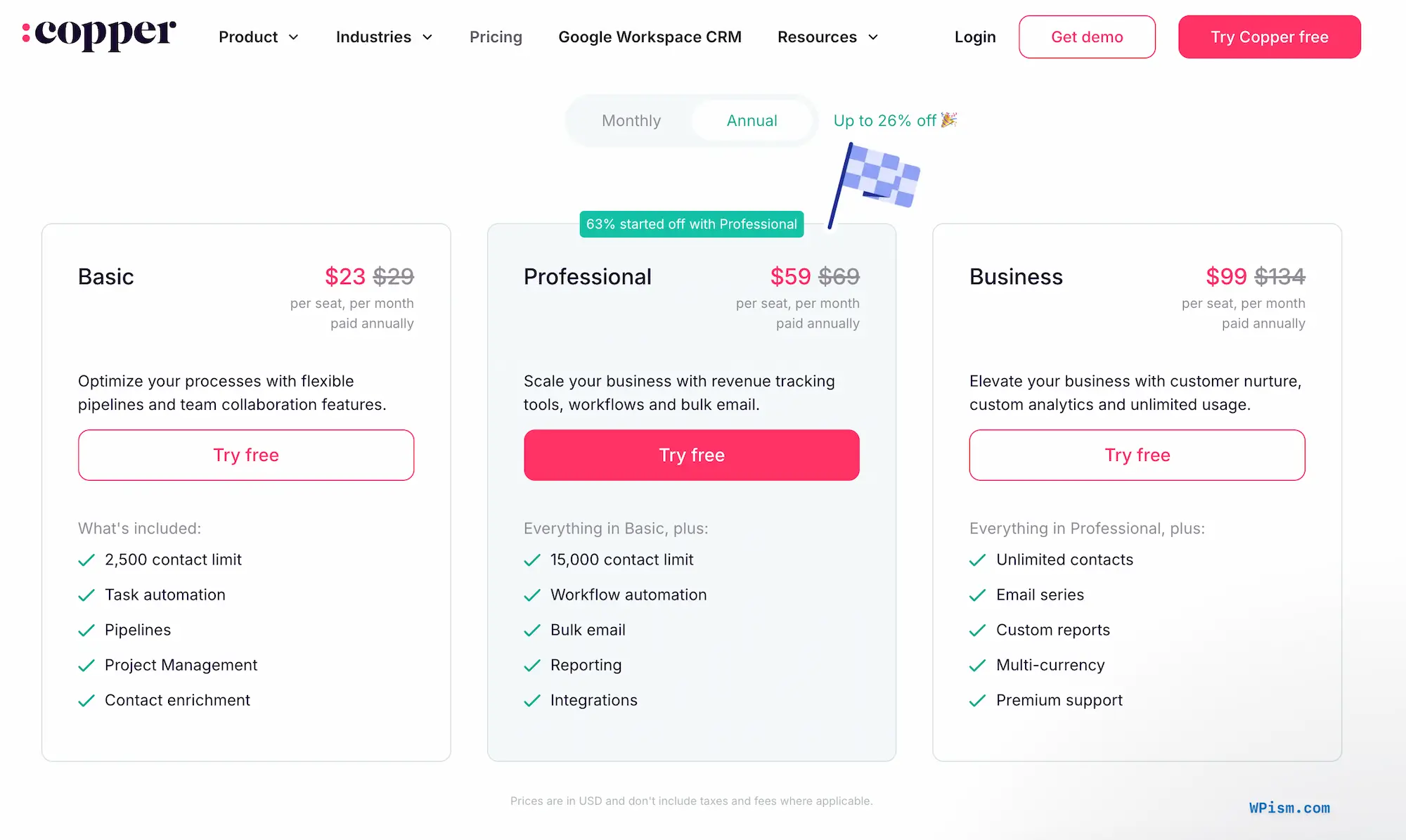
Step 2: Toggle billing to annual – Flip the pricing switch from monthly to annual to expose the discounted per-seat rates.
Step 3: Sign up with your Google account – Choose the Google sign-up button so Copper connects to your inbox, calendar, and Drive from the first minute.
Step 4: Pick Basic, Professional, or Business – Select the tier that matches your contact volume, start the 14-day trial, and add payment details only when you decide to keep it.
Step 5: Confirm the discount at checkout – Check that the reduced annual rate shows on your invoice before you complete the purchase.
By following these steps, you activate the Copper deal and get your CRM live inside Gmail the same afternoon.
Copper Pricing Plans and Discount
Copper charges per seat across three tiers, and every plan opens with the same 14-day trial. Annual billing carries the discount, with the deepest saving landing on the top tier.
| Plan | Annual (per seat/month) | Monthly (per seat/month) | You Save | Contact Limit | Custom Fields | Headline Inclusions |
|---|---|---|---|---|---|---|
| Basic | $23 | $29 | 21% | 2,500 | 25 | Pipelines, project management, task automation, contact enrichment |
| Professional | $59 | $69 | 14% | 15,000 | 50 | Workflow automation, bulk email, reporting, full integrations library |
| Business | $99 | $134 | 26% | Unlimited | Unlimited | Email series, custom reports, multi-currency, Okta SSO, premium support |
The headline 26% saving applies to the Business tier, where the gap between monthly and annual billing is widest. Basic still trims a fifth off your per-seat cost, so annual billing pays for itself on any tier you plan to keep past four months.
Basic
Basic suits a solo consultant, a two-person studio, or a founder who wants pipelines and clean contact records without paying for automation depth. You still get the Chrome extension, the Gmail and Calendar sync, and project pipelines at this level, which puts it well ahead of most entry tiers in the CRM market.
The 2,500-contact ceiling is the number to watch. Teams that import a large marketing list burn through it quickly, and I would rather see you start on Professional than migrate data twice in a single quarter.
Professional
Professional is the tier most Copper customers pick, and the reason shows up in the feature list: workflow automation, bulk email sent from your own Gmail address, and the full reporting suite. Those three together remove the manual admin that quietly kills CRM adoption in small teams.
At $59 per seat annually, a five-person team pays $3,540 a year. Weigh that against the hours your team currently spends copying email threads into records, and the maths usually favours the upgrade well before you hit the 15,000-contact limit.
Business
Business earns its price once contact volume climbs or you invoice in more than one currency. Unlimited records, custom report building, automated email series, Okta single sign-on, and premium support turn it into the tier for agencies running several account teams in parallel.
This tier also carries the full 26% annual saving, dropping you from $134 to $99 per seat. If you were already heading toward Business, taking the annual route through the partner link is the single largest cost decision available on this deal.
Copper Overview and Features
Copper launched in 2012 and now serves more than 30,000 companies across 100+ countries. Agencies, consultancies, media companies, production studios, construction firms, and financial advisers make up the core of that base, which tells you exactly who the product designs for: businesses where revenue comes from relationships rather than transaction volume.
The Google relationship separates Copper from every other CRM in its price bracket. It holds Recommended for Google Workspace status, sits in the Chrome Enterprise partner programme, and counts Google among its backers. Connect a Workspace account and Copper populates contacts and conversation history immediately, which spares you the empty-database problem that stalls so many CRM rollouts in week one.
Built Directly Into Google Workspace
The Chrome extension puts Copper in the right-hand panel of Gmail. Hover over a sender and you see their past deals, open tasks, linked files, and recent notes without opening a new tab, and you can create a contact or an opportunity from that same panel while the thread sits in front of you.
Google Calendar receives the same treatment. Open an event and Copper surfaces the client record, earlier meeting notes, and documents attached to the account, so you walk into a call already briefed. Gemini records and transcribes the meeting, then pushes the transcript onto the Copper record in a single click.
Contact Capture and Automatic Enrichment
Manual data entry destroys CRM adoption faster than any missing feature. Copper enriches new records on its own, pulling phone numbers, secondary email addresses, company details, and social profiles from public sources so your team types far less.
It also watches your inbox for people who belong in the system and suggests them as contacts. The mobile app scans business cards into records for conference leads, and the LinkedIn Chrome extension lets you research a prospect on their profile and drop them straight into a lead pipeline.
Visual Sales Pipelines With AI Flags
Pipelines use drag-and-drop stages you define, with deal value, owner, expected close date, and any custom fields you need visible on each card. Sort by value or win probability and the real money in your pipeline separates itself from the noise.
Copper’s AI flags handle the chasing. The system surfaces deals that have gone quiet, spots bottlenecks where opportunities pile up in one stage, and highlights high-value records that deserve attention this week. Pipeline templates give you a working structure if designing one from scratch feels like a job for later.
Project Delivery After the Close
Most CRMs stop at the signature. Copper carries the relationship forward, converting a won opportunity into a project pipeline for delivery, onboarding, or partnership management, which eliminates the handoff document entirely.
Your sales notes, the client’s email history, the signed contract, and the delivery checklist all live on one record. The producer or account manager picking up the work starts with full context instead of a Slack thread and a folder of PDFs. Tasks and subtasks break each project into assignable pieces with due dates on the cards, and you choose between kanban boards and list views.
Email, Templates, and Automations
Copper sends from your own Gmail address, so deliverability and replies stay where they belong. Templates with merge fields handle repetitive sends, and an AI assistant drafts messages or rewrites your draft for tone, length, or clarity.
Automations cover the follow-up discipline that busy teams drop first: a welcome email when someone submits your contact form, a task queued when a deal reaches proposal stage, a kickoff message when a project starts, a check-in once delivery wraps. Rekindle emails deserve their own mention, nudging contacts who have gone silent past a threshold you set, which is how dormant accounts turn back into pipeline. Open and click tracking show you which messages actually land.
Reporting and Revenue Forecasting
The reporting suite covers sales history, forecasting by expected close date, goal tracking, win rates by individual or team, lead conversion quality, and loss reason analysis. Templates give you one-click dashboards for the standard questions, and custom dashboards let you rearrange charts, apply filters, and define your own KPIs.
Copper also runs the calculations that agencies care about, working out commissions, agency profit, and margin through automations and feeding those figures into reports. Export anything to Google Sheets through the custom report builder, or connect Looker Studio to place Copper data alongside your other sources.
Mobile Logging for Field Teams
The iOS and Android apps log calls and SMS automatically, keeping records current for people who spend their week away from a desk. Construction firms and production companies lean on this hardest, since the person standing on the job updates it from the job.
Integrations That Cover the Gaps
Native integrations reach Slack, QuickBooks, DocuSign, PandaDoc, Mailchimp, JustCall, RingCentral, Zendesk, and Surfe for LinkedIn outreach, with Mailchimp running a genuine two-way sync. Zapier opens the door to more than 5,000 further apps, and an API plus an embedded integration SDK handles anything bespoke. Specialist tools plug in as well, including Parallax for agency resource planning, Coda for internal documentation, and Timmy.io for production scheduling.
All Copper Deals and Promotions
Three routes run through the WPism partner link right now, and you can combine two of them.
14-Day Free Trial With Instant Activation
Copper opens with a full 14-day trial that needs no credit card and activates instantly. Trial accounts run the real product rather than a stripped demo, so you can connect Workspace, import contacts, build a live pipeline, and test automations and reporting properly before spending anything.
Up To 26% Off Annual Billing
Switching from monthly to annual billing cuts your per-seat rate by as much as 26%. Basic drops from $29 to $23, Professional from $69 to $59, and Business from $134 to $99 per seat per month. The saving applies for as long as you stay on annual terms, which makes it the highest-value part of this deal for any team past the evaluation stage.
Google Sign-Up With Instant Data Import
Creating your account through the Google button rather than an email and password does more than save typing. Copper immediately imports contacts and conversation history from your Workspace account, so your first pipeline sits on real data instead of a blank grid.
| Offer | What You Get | Best For |
|---|---|---|
| Free trial | 14 days, full feature access, no card required | Teams comparing CRMs side by side |
| Annual billing | Up to 26% off list pricing | Buyers ready to commit for a year |
| Google sign-up | Contacts and email history pre-loaded | Anyone already running Google Workspace |
Who Qualifies
The deal opens to new Copper accounts worldwide, at any team size, on any of the three plans. No promo code changes hands, because the offer attaches to your session through the partner link and appears at checkout on its own. You can add seats after claiming, and each new seat bills at your discounted annual rate.
Copper Deal FAQs
Copper Reviews
Copper carries a strong reputation among small and mid-sized service businesses. It holds 4.5 out of 5 on G2 across more than 1,150 reviews, with 74% of reviewers awarding five stars, and 4.4 out of 5 on Capterra from over 600 reviews. Small businesses account for roughly 79% of its G2 review base, which confirms where the product performs and where it does not.
What Users Appreciate Most
Setup speed dominates the feedback. Teams migrating from heavier platforms describe going live in days against the months their previous rollout consumed, and several Capterra reviewers report having the whole team working inside 24 hours after leaving HubSpot behind. Connecting Google Workspace does most of that work by populating contact history before anyone touches a spreadsheet.
The Gmail panel is the second recurring theme, and I find it the single feature that changes team habits. Logging activity where the activity happens removes the end-of-day catch-up ritual, and record quality climbs as a direct result.
Where Copper Performs Well
Account managers running several client relationships single out the activity feed, since nobody has to interrupt a colleague to ask what happened on a call they missed. Reviewers on Gartner Peer Insights point to the same strength: fragmented communication pulled into one visible timeline.
Long-term users also praise how the pipeline structure grows with them, starting simple and adding stages, custom fields, and parallel pipelines as the business gets more complex. Ease of use scores 9.0 out of 10 on G2, which explains why adoption rarely becomes the fight it does elsewhere.
Common Points of Feedback
Reporting draws the most consistent criticism. Reviewers who want deep custom analytics find the lower tiers thin and end up either upgrading to Business or connecting Looker Studio through the free native connector, which works well but needs someone comfortable building reports.
Support quality is the other flag worth knowing about. Copper scores 8.2 out of 10 for support on G2, trailing several direct competitors, and a portion of reviewers report slower resolution than they expected. Data export also attracts complaints, with some users describing the process as awkward when migrating history in or out. The 2,500-contact cap on Basic pushes marketing-heavy teams to Professional earlier than they planned, and entry pricing sits above budget CRMs.
Overall Sentiment
The consensus reads clearly across every review platform: choose Copper when your business runs on relationships and your team runs on Gmail. In that context it is one of the highest-rated tools available at this price. Teams outside Google Workspace, or those wanting a heavyweight sales machine with deep native marketing automation, will find better matches elsewhere, and Copper makes no attempt to pretend otherwise.
Copper CRM
Copper is a Google Workspace CRM that helps relationship-driven businesses manage contacts, sales pipelines, client projects, and communication inside Gmail, Calendar, and Drive.
Price: 23
Price Currency: USD
Application Category: BusinessApplication
5
Pros
- Best Gmail and Google Workspace integration available
- Projects continue after the deal closes
- Live in days, not months
Cons
- Entry pricing sits above budget CRMs
- Basic plan caps contacts at 2,500
- Reporting depth needs the top tier
Copper Alternatives
Copper fits relationship-driven service businesses exceptionally well, though a different shape of company sometimes calls for a different tool.
Pipedrive
Pipedrive is the sharpest pure sales CRM in this group, starting at $14 per user per month on its Essential plan and building everything around visual pipelines and activity-based selling. It treats post-sale delivery as an add-on rather than a first-class workflow, so agencies running projects after the close lose the continuity Copper provides. Choose Pipedrive when your team sells and hands off, and you want the cheapest strong pipeline tool available.
HubSpot CRM
HubSpot leads with a genuinely free tier and the broadest marketing automation stack on the market, covering landing pages, ad management, and full campaign attribution that Copper leaves to integrations. The trade-off arrives at scale, where the jump from Starter to Professional pricing is steep and onboarding fees apply. Choose HubSpot when marketing automation sits at the centre of your growth plan and you can absorb the cost as you climb tiers.
Zoho CRM
Zoho CRM starts around $14 per user per month and connects to an enormous suite of business apps, which appeals to cost-conscious teams that want one vendor for everything. Configuration takes real effort, and the Gmail experience never approaches what Copper delivers natively. Choose Zoho when budget leads the decision and you have someone willing to invest time in setup.
Streak
Streak lives entirely inside Gmail as a browser extension, offers a real free plan, and charges $49 per user per month for Pro. It stays lighter than Copper on projects, reporting, and automation, and it lacks the Calendar and Drive depth that makes Copper feel like part of Workspace. Choose Streak when you are a solo operator or a tiny team that wants pipelines in the inbox at zero or minimal cost.
Insightly
Insightly pairs CRM with project management much as Copper does, priced at $29 per user per month for Plus and $49 for Professional on annual-only billing. It offers more granular project controls, while asking for more admin time and often a paid onboarding package to configure properly. Choose Insightly when project governance matters more to you than inbox speed and you have the appetite for a longer setup.
Claim Your Copper Deal
A CRM your team ignores costs more than one you pay for, and Copper solves that problem by living where your team already spends the day. If you run an agency, a consultancy, or a studio on Google Workspace, I rate it as one of the strongest options at this price, particularly once deals flow straight into delivery pipelines rather than handoff documents.
Use the WPism partner link to start your 14-day free trial with no card, then switch billing to annual and lock in up to 26% off when you decide to stay. No code is needed at any stage.
Connect your Workspace account today, let Copper import your contact history, and run a real pipeline before the trial ends.
Tags:
Author: Pradeep Singh
Pradeep Singh is the founder and your host here at WPism. He is an entrepreneur and blogger living his startup life based in London and Cambridge. Connect with him on LinkedIn, follow him on Twitter or like his page on Facebook.