
Riverside Coupon Code 2026: Claim 20% OFF + Free Trial

Written By:
Pradeep Singh
Last Updated: August 30, 2026
Disclosure: This post may contain affiliate links, meaning if you decide to make a purchase via my links, I may earn a commission at no additional cost to you. See my disclosure for more info.
Riverside is an all-in-one recording studio that captures every participant locally in up to 4K video and uncompressed audio, then edits, clips and publishes the result with AI.
We have partnered with Riverside to give you 20% off your first payment on any consumer paid plan with the promo code STARTGROUND.
| Riverside Deal | Offer | How to Claim |
|---|---|---|
| Exclusive Partner coupon | 20% off the first payment on any B2C paid plan | Partner link + code STARTGROUND |
| Free trial | 14 days on Pro, Grow or Webinar with no charge upfront | Start from the partner link |
| Annual billing saving | Up to 20% off the standard monthly rate | Switch the billing toggle to yearly |
Below I walk you through the redemption process, the pricing tiers, what Riverside actually does well, and how it compares to the tools you might be weighing it against.
Steps to Apply Riverside Coupon Code
You can easily claim the Riverside deal in less than two minutes. The code applies at the payment screen rather than during account creation.
Step 1: Open the WPism partner link – Click our exclusive Riverside link to land on Riverside’s site with the offer attached to your session.
Step 2: Create your free account – Sign up with an email address or a Google login and head straight to the pricing page.
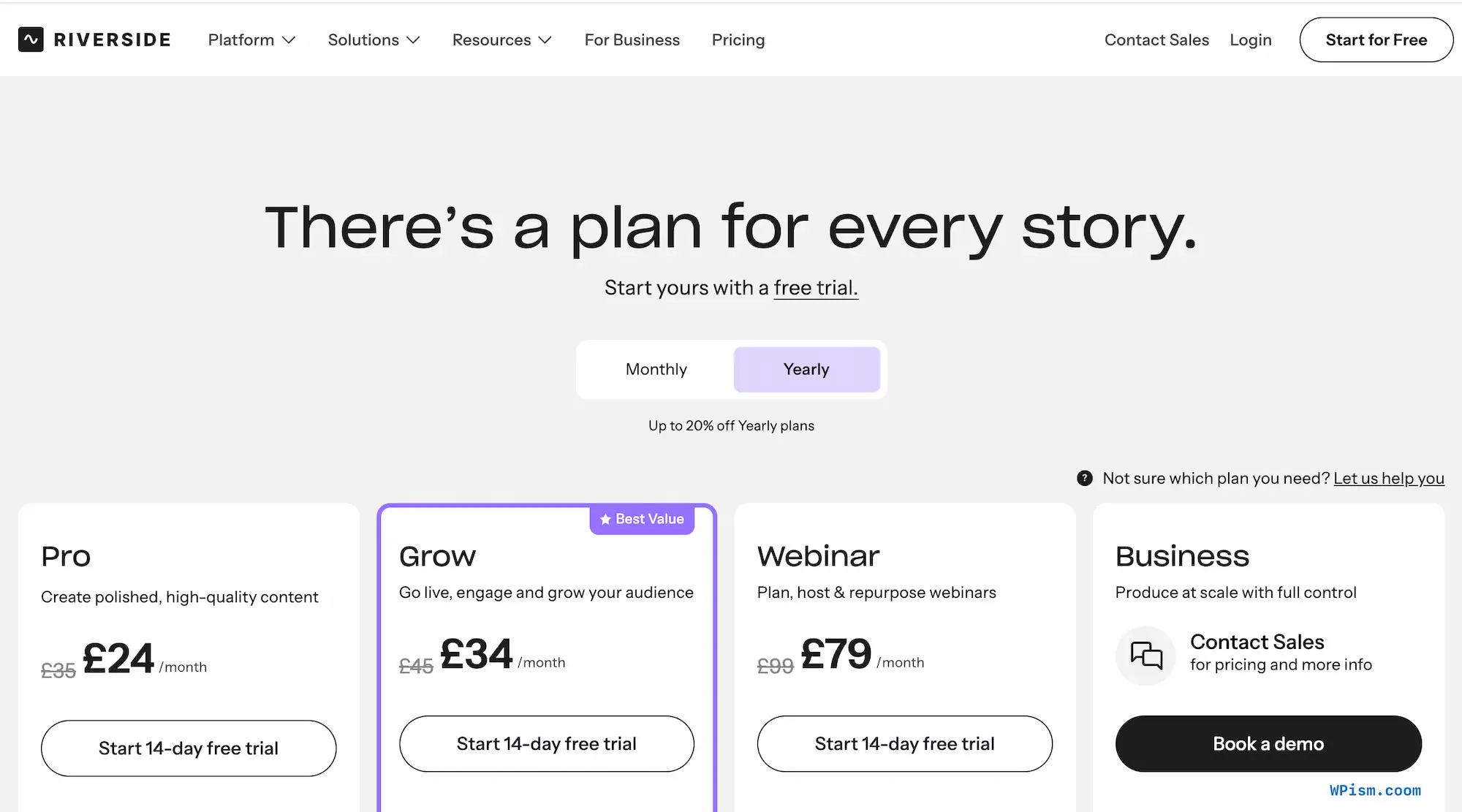
Step 3: Pick your plan and billing cycle – Choose Pro, Grow or Webinar, then set the toggle to monthly or yearly. The coupon works on both. [Screenshot: Riverside pricing page with the yearly toggle active]
Step 4: Enter STARTGROUND at checkout – Type the code into the promo field on the payment screen.
Step 5: Confirm the reduced total – Check that the lower amount shows in your order summary before you submit your card details.
Follow those five steps and you activate the Riverside coupon on your first invoice, then start recording in studio quality the same day.
Riverside Pricing Plans and Discount
Riverside runs three self-serve tiers plus a custom-priced Business plan, and every paid tier ships with unlimited recording hours, local recording, up to 4K desktop capture and podcast hosting. The differences come down to studios, download hours and the growth tools stacked on top. Yearly billing already trims up to 20% off the standard rate, and your WPism code takes a further cut off whichever first payment you make.
| Plan | Monthly | Yearly (per month) | Studios | Separate track downloads | Best for |
|---|---|---|---|---|---|
| Pro | £35 | £24 | 1 | 15 hrs/month | Solo creators and single-show podcasters |
| Grow | £45 | £34 | 2 | 20 hrs/month | Creators adding live streaming and audience tools |
| Webinar | £99 | £79 | 3 | 25 hrs/month | Marketers running registration-driven events |
| Business | Custom | Custom | Unlimited | Unlimited | Teams needing producer mode, SSO and API access |
Prices display in your local currency at checkout, and every paid tier includes a 14-day free trial before any charge lands.
Pro
Pro covers the core promise: 4K local capture, 48kHz audio, no watermark, unlimited text-based editing, unlimited transcriptions, and podcast hosting with analytics. One studio and 15 hours of separate track downloads suit a weekly interview show comfortably. Annual billing brings the effective rate to £24 a month, which works out at £288 for the year, and the coupon pulls roughly £58 off that first invoice. I recommend Pro to anyone publishing one show who wants recording quality sorted before anything else.
Grow
Grow adds the audience layer: full HD 1080p multistreaming to unlimited destinations, omnichat, custom overlays and lower thirds, backstage speaker management, social scheduling, a newsletter tool, a creator website and AI thumbnails. Two studios and hosting for two shows make it the natural home for a creator running a podcast alongside a live format. The £10 monthly gap over Pro pays for itself the moment you stream anywhere other than a single platform.
Webinar
Webinar targets marketing teams. You get registration pages with custom branded forms, branded email reminders, Q&A, polls, live call-ins, recurring sessions, webinar analytics and a HubSpot integration that pushes registrant data into your CRM automatically. Three studios and 25 hours of track downloads support a regular events calendar. Apply the coupon to an annual Webinar subscription and you take the sharpest absolute saving Riverside’s self-serve range offers.
Business
Business sits on custom pricing and covers producer mode, remote control of guest inputs, async recording, presentation recording, custom frame rates, collaborative editing, Salesforce and Marketo integrations, API access, SSO, SOC 2 and ISO 27001 compliance, and a dedicated CSM. This tier falls outside the WPism promotion, so treat it as the upgrade path once your production volume outgrows three studios.
Riverside Overview and Features
Every remote creator hits the same wall: a video call compresses your footage and your guest’s microphone into a file you cannot rescue in post. Riverside removes that ceiling by recording each participant’s camera and microphone on their own device, then uploading those files to the cloud progressively while the conversation continues. Your internet connection shapes the live chat, never the media you keep.
What began as a recording tool now spans the full lifecycle — capture, edit, repurpose, stream, host and publish. Spotify, Microsoft, Marvel and Vercel produce on it, and the platform holds a 4.8 rating on G2 across more than 1,500 reviews.
Local Recording at Studio Quality
Riverside captures up to 4K video and uncompressed 48kHz WAV audio directly on each device, with automatic cloud backups and progressive uploading running in the background. Seconds after you stop, finished media waits in your dashboard instead of sitting in a guest’s downloads folder awaiting a file transfer. Screen shares record as their own high-quality track, which matters when you demo software and need the pixels to survive.
Separate Tracks for Every Speaker
Each host and guest arrives as an individual, perfectly synced audio and video track. That separation unlocks real post-production: strip out crosstalk, duck one microphone, switch layouts by speaker, or cut a participant entirely without disturbing anyone else. Riverside also separates tracks on uploaded recordings, so footage you captured elsewhere still benefits.
Text-Based and Timeline Editing
You edit the video by editing its transcript — search a phrase, delete the sentence, and the cut applies instantly. Anyone comfortable in a word processor can now ship an episode, which removes the wait for an editor to open a timeline for a two-minute trim. When you want granular control, the full timeline gives you splits, trims, track dragging, overlays, music and b-roll, and a chat-based agent handles instructions like removing a specific tangent.
AI Clean-Up and Correction
Magic Audio lifts clarity and cuts background noise so a mid-range USB microphone sounds closer to a treated booth, while Smart Mute silences anyone who isn’t speaking. The AI suite strips filler words and silences at a sensitivity you set, corrects eye contact when you glanced at your notes, adjusts colour per speaker, and generates b-roll. VideoDub goes further: fix a misspoken line in the transcript and the model regenerates matching audio in your own voice with synced lips.
Repurposing With AI Co-Creator
Magic Clips scans your session for the strongest moments and cuts them into ready-to-post social videos with animated captions. AI Co-Creator turns the same recording into blog posts, newsletters, thumbnails and headline sets shaped for each channel, alongside automatic titles, descriptions, chapters and show notes. Transcription covers 100+ languages, and AI translation extends a single recording into 30+ languages in your own voice.
Live Streaming and Webinars
Grow unlocks 1080p streaming to YouTube, LinkedIn, Facebook, X, Twitch and any custom RTMP endpoint at once, with omnichat pulling every platform’s comments into one window. The Webinar tier layers on registration, automated reminders, polls, live call-ins and lead capture, and every event records in full quality before feeding straight back into the clip pipeline.
Podcast Hosting and Analytics
Hosting comes bundled with paid plans. Riverside generates your RSS feed, distributes to Spotify, Apple Podcasts, YouTube, Pocket Casts and Castbox, then reports streams by episode, app and country so you can see which topics genuinely pulled an audience.
Apps and Production Extras
Dedicated Mac, iOS, Android and iPad apps let you record on the move or turn a phone into a second camera, and in-person multi-cam recording covers sessions where everyone shares a table. A teleprompter holds your script, the Media Board fires intro stings and transitions live, and virtual backgrounds keep the frame tidy.
All Riverside Deals and Promotions
WPism lists one exclusive Riverside coupon alongside the platform’s standing offers, and you can combine two of the three.
WPism Exclusive: 20% Off Your First Payment
Open the partner link, choose any consumer paid plan, and enter STARTGROUND at checkout to take 20% off that first payment. The code works across monthly and yearly billing on Pro, Grow and Webinar. Riverside’s Business plan sits outside the promotion.
14-Day Free Trial on Every Paid Tier
Riverside runs a two-week trial with no card charged upfront. Record a real episode, test the separate tracks against your editing workflow, and apply the coupon only once you know the platform earns its place in your stack.
Save Up to 20% With Annual Billing
Switching from monthly to yearly billing drops the effective rate on every tier. Stack that with the WPism code and your first year lands at the lowest entry point Riverside offers.
Eligibility: The coupon covers new paid subscriptions on any self-serve tier, on either billing cycle, and applies to the first payment only. You must enter the code at checkout for the discount to register, and the Business plan does not qualify.
Riverside Deal FAQs
Riverside Reviews
A 4.8 average on G2 across more than 1,500 reviews places Riverside near the top of its category, and the customer list — Spotify, Microsoft, Marvel, Tim Ferriss, Morning Brew — shows it survives enterprise scrutiny as well as solo-creator budgets.
What Users Appreciate Most
Recording quality dominates the feedback. Creators who moved across from video-call recordings describe the jump as immediate: sharp 1080p and 4K files where they previously accepted soft, compressed footage, and clean uncompressed audio that survives mastering. Guests like the one-click browser join with nothing to install, which removes the ten-minute tech-support call that used to open every session.
Where Riverside Performs Well
The editing suite generates the loudest enthusiasm. Users routinely report cutting hours from each episode, with several describing 10 to 15 hours saved on a single production once transcription, clip generation and show notes stopped being manual jobs. Text-based editing gets singled out by people who never learned a traditional timeline and now publish episodes themselves.
Common Points of Feedback
Browser-based local recording asks something of your machine. Older laptops and small SSDs can struggle through long 4K multi-participant sessions, and uploads take time to finish on weak connections even though the files stay pristine. Some users find the AI credit allowances tight once they lean heavily on generation features, and the feature surface has grown broad enough that new subscribers need a session or two to find everything.
Overall Sentiment
The consistent thread is consolidation: Riverside replaces a recorder, an editor, a clip generator, a host and a streaming tool at once, and that combination justifies the spend for most people who stay. In my view the pricing sits above the budget end of the market for a defensible reason, and the coupon softens the entry cost while you decide.
Riverside

Riverside is an online recording and editing platform that captures up to 4K video and uncompressed audio locally for every participant, then edits, repurposes, streams and publishes that content from a single workspace.
Price: 24
Price Currency: GBP
Application Category: MultimediaApplication
4.5
Pros
- Local 4K recording unaffected by internet quality
- Separate synced tracks for every participant
- AI editing, clips and hosting included
Cons
- Expensive than budget podcast tools
- Long sessions demand strong local hardware
- AI credit limits apply on lower tiers
Riverside Alternatives
Riverside leads on capture quality and end-to-end workflow, though different priorities point toward different platforms.
Descript
Descript built its reputation on the same text-based editing concept and pushes deeper into audio production with Overdub voice cloning and a sophisticated multitrack timeline. Its recording layer stays lighter than Riverside’s 4K local capture with progressive upload. Choose Descript when editing sophistication matters more to you than the quality of the session you record.

StreamYard
StreamYard focuses squarely on live output — simple multistreaming, on-screen guests and branded layouts at a lower entry price. Its cloud-first model does not hand you separate 4K tracks for post-production. Choose StreamYard when the broadcast itself is the finished product rather than raw material.
Zencastr
Zencastr targets audio-first podcasters with local recording and a straightforward publishing path at a friendly price. Riverside offers considerably more on video and repurposing, from AI clips to translation, streaming and webinars. Choose Zencastr when your show never leaves audio.
Zoom
Zoom already sits in most calendars and costs less as a meeting tool, but its recordings compress into a single mixed file that caps what you can do afterwards. Riverside exists precisely because that ceiling frustrates anyone publishing a conversation rather than archiving it. Choose Zoom when you need a meeting platform, not a production one.
Claim Your Riverside Deal
Recording quality is the one thing you cannot fix later, and Riverside protects it from the first second of every session while handling the editing, clipping and publishing that normally follow. If you publish conversations for a living, I rate it as the strongest all-in-one option on the market right now.
Start the 14-day trial through the WPism partner link, record a real episode on your own gear, then enter STARTGROUND at checkout when you convert. Annual billing plus the coupon gives you the lowest first-year entry point available on Pro, Grow or Webinar.
Claim the offer today and start publishing content that sounds like it came out of a studio.
Tags:
Author: Pradeep Singh
Pradeep Singh is the founder and your host here at WPism. He is an entrepreneur and blogger living his startup life based in London and Cambridge. Connect with him on LinkedIn, follow him on Twitter or like his page on Facebook.