
Fyxer Coupon 2026 – Claim 20% OFF + 7 Days Free Deal

Written By:
Pradeep Singh
Last Updated: August 29, 2026
Disclosure: This post may contain affiliate links, meaning if you decide to make a purchase via my links, I may earn a commission at no additional cost to you. See my disclosure for more info.
Fyxer is an AI email assistant that sorts your Gmail or Outlook inbox, writes replies in your own tone and takes notes in your meetings. WPism has partnered with Fyxer to give you 7 days free plus 20% off your first two months with the promo code STARTGROUND20OFF.
| Deal | Offer | How to Claim |
|---|---|---|
| WPism exclusive partner offer | 7 days free, then 20% off your first 2 months on any paid plan | Partner link on this page, or code STARTGROUND20OFF at checkout |
| Fyxer free trial | 7 days of full access with no card commitment | Included automatically with the partner offer |
| Annual billing discount | 25% off the standard monthly rate on Starter and Professional | Switch the billing toggle to annual at checkout |
Below, I walk through the redemption process, the real cost of each plan once the coupon lands, the features that justify the subscription, and the alternatives worth a look before you commit.
How to Redeem Fyxer Promo Code?
The Fyxer coupon attaches during sign-up rather than after it, so start from the partner link before you create an account.
Step 1: Click our exclusive partner link – The link takes you to the exclusive partner page of StartGround with the offer already reflected on the page (see screenshot below)
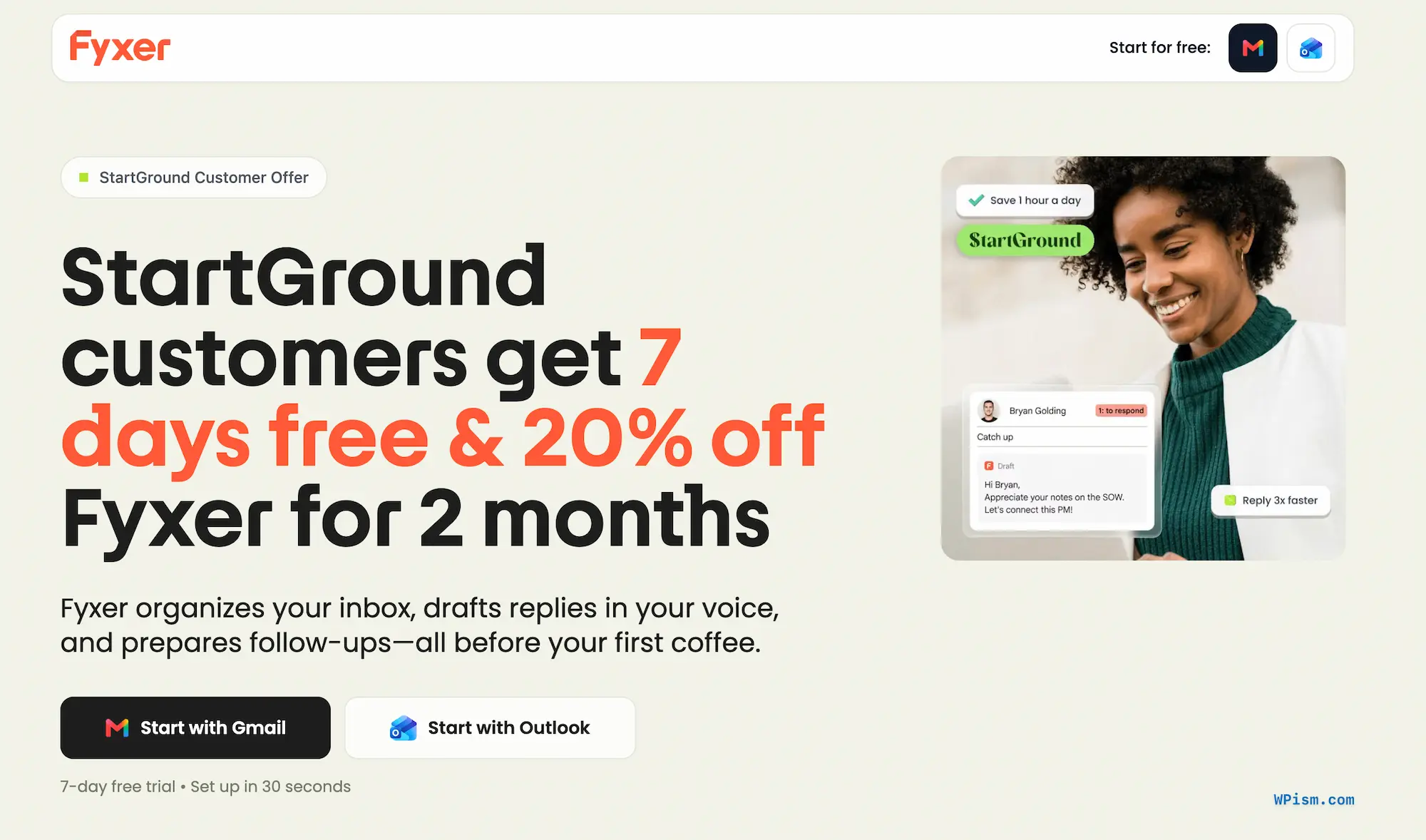
Step 2: Choose Gmail or Outlook – Pick the inbox you live in and authorise the connection with one click.
Step 3: Apply the promo code STARTGROUND20OFF – Paste the code into the promo field at checkout if you would rather enter it manually.
Step 4: Start your 7-day free trial – Fyxer begins learning your writing style straight away and your card stays untouched for the first week.
Step 5: Confirm the discount on your first invoice – Select Starter or Professional before the trial expires and check that the reduced rate appears on your billing page.
By following these steps, you can activate the Fyxer promo code and start clearing your inbox with an assistant that already knows how you write.
Fyxer Pricing and Plans
Fyxer charges per user across three tiers, and the WPism coupon takes a fifth off whichever paid plan you land on for your opening two invoices. Every paid plan carries the same 7-day trial, so you pay nothing until you decide the assistant earns its keep.
| Plan | Monthly | Annual (per user/month) | With WPism coupon (first 2 months) | Best for |
|---|---|---|---|---|
| Starter | $30 | $22.50 | $24 | One inbox and one calendar, solo operators |
| Professional | $50 | $37.50 | $40 | Multiple inboxes, client-facing teams, HubSpot users |
| Enterprise | Bespoke | Bespoke | Negotiated | Organisations rolling out 50+ seats |
Starter
Starter connects a single inbox and calendar, and it still ships with the three capabilities that make Fyxer worth buying: priority labelling, drafted replies in your voice, and the meeting notetaker. Freelancers, consultants and solo founders rarely need more, and I would start here even if you suspect you will upgrade later.
At $30 a month the plan asks you to save roughly half an hour a week to break even on a typical professional hourly rate. The coupon drops your first two invoices to $24, which buys you a longer runway to judge that maths honestly before Fyxer moves onto full price.
Professional
Professional exists for the moment your work spreads across more than one address. It handles multiple inboxes and calendars, adds Fyxer Chat for querying your own email history, syncs with HubSpot, schedules across teams and time zones, lets you upload files that teach the assistant your pricing and contract language, and includes an onboarding session with a specialist.
Sales professionals, recruiters, agency owners and executives running a personal address alongside a sales or support alias get the clearest return here. Paying the extra $20 per user purely because the plan sits higher on the page wastes money, so my advice is simple: trial Professional, and drop to Starter before billing starts if you never touch the chat, scheduling or CRM features.
Enterprise
Enterprise suits organisations deploying Fyxer to 50 or more people, and Fyxer quotes it directly rather than publishing a seat price. The package layers SSO and SCIM provisioning onto automated team setup, adds customised security controls, and assigns you a dedicated account manager plus a tailored onboarding programme.
Fyxer also supplies internal marketing support at this tier, which matters more than it sounds. Rollouts stall when half a department never connects their inbox, and adoption drives every hour the tool claims to give back.
Fyxer Features
Fyxer AI Limited built its assistant on a straightforward premise: the admin layer around your email eats hours that never show up on any scorecard. Reading, filing, drafting, chasing and note-taking consume a morning without moving a single deal forward, and Fyxer removes that layer while leaving your actual email client alone.
More than 100,000 professionals use it, and organisations including AT&T, eXp Realty, Knight Frank, Celonis and SoundCloud run it across client-facing teams. Fyxer’s own customer data points to 3.45 hours saved per person each week and a 48% shift toward proactive work, with 640 hours of productive time recovered weekly across deployed teams. Setup takes around 30 seconds because there is nothing to configure.
Automatic Inbox Organisation
Fyxer reads every incoming message and applies a numbered priority label directly inside Gmail or Outlook: to respond, FYI, notification, follow up, comment, meeting update and marketing. Anything that genuinely needs you rises to the top, and roughly half of your inbox noise disappears from the main view without being deleted.
You keep full control of the taxonomy. Correcting a misfiled message teaches the system your preferences, and the labels stay editable, which matters during the first fortnight while Fyxer learns the difference between a client invoice and a supplier newsletter.
Personalised Draft Replies
The drafting engine studies your sent folder — your greetings, sentence length, vocabulary, sign-offs and the particular way you decline something politely. It then writes replies to the messages that warrant one and parks them in your drafts folder, ready for review.
Fyxer never sends on your behalf. You open the draft, adjust a line, and hit send, which keeps the final word on every client relationship with you. Fyxer reports drafting speeds around 3.2x faster than writing from scratch, and the practical effect for most people is a shift from composing emails to editing them for twenty or thirty seconds.
Meeting Notetaker
Connect your calendar and the notetaker joins your calls across Zoom, Google Meet, Microsoft Teams and Outlook. You get transcription, speaker identification and automatic extraction of decisions and action items, with a summary and a ready-to-send follow-up email landing in your inbox roughly a minute after the call ends.
A desktop Notetaker app for Mac and Windows records device-side, which covers in-person conversations and any call that a meeting bot cannot join. Professional users can also customise the notetaker output to match how their team records decisions.
Scheduling Assistant
Set your preferred meeting hours once and Fyxer only ever offers slots inside that window. When a thread turns into a call, the drafted reply arrives with your personal scheduling link embedded, and the recipient books themselves in without a single availability email.
Time zone detection runs automatically and buffer time between meetings follows your settings. Professional adds team links with round-robin assignment and whole-team availability, which recruiters and sales teams will get the most from.
Fyxer Chat and Contact Memory
Fyxer Chat turns your inbox and meeting notes into something you can interrogate. Ask what a client committed to on last month’s call, which threads still sit unanswered, or what the agreed deadline was on a project you half remember, and Chat pulls the answer from your own history. You can also brief it to write a fresh email from scratch.
Contact memory runs quietly underneath. Fyxer keeps track of your history with each person so drafts arrive already aware of the last conversation, and a refresher email lands before your next meeting with the same contact.
Follow-Up Tracking and Thread Summaries
Threads that go quiet get flagged before the opportunity cools, and Fyxer drafts the nudge for you rather than simply reminding you to write one. You choose how often those prompts surface, so the feature stays useful instead of nagging.
Long chains come with condensed summaries. Catching up on a forty-message thread you were copied into halfway through takes seconds rather than a coffee break.
HubSpot Sync and File-Based Training
Professional users upload contracts, proposals, pricing sheets and internal playbooks to the dashboard, and Fyxer draws on them when drafting. Replies then quote your actual terms rather than producing something generic that you rewrite anyway.
The HubSpot integration pulls CRM context into the same picture, so a reply to a prospect reflects where that deal sits in your pipeline. Sales teams get the strongest case for Professional from this pairing alone.
Security and Compliance
Connecting an assistant to a work inbox deserves more scrutiny than installing an ordinary app, and Fyxer’s compliance posture holds up. The company maintains SOC 2 Type 2, ISO 27001, GDPR and HIPAA compliance, and states that customer data never trains outside models.
Enterprise customers add SSO, SCIM and customised security controls on top. Teams handling regulated, legal, healthcare or financial data should still run Fyxer’s security documentation past their own internal policy before connecting company accounts.
All Fyxer Deals and Offers
WPism arranged this offer directly with the Fyxer team, and two savings apply to new accounts right now.
7 Days Free Plus 20% Off Two Months
The WPism exclusive gives you a full week of unrestricted access followed by a fifth off your first two invoices on Starter or Professional. New signups qualify, and Fyxer places no cap on seats, so a solo consultant and a fifteen-person sales floor claim identical terms. Start from the partner link on this page or enter STARTGROUND20OFF at checkout to attach it manually.
25% Off Annual Billing
Fyxer prices annual plans a quarter below the monthly rate, bringing Starter to $22.50 per user per month and Professional to $37.50. Annual billing collects the full year upfront, so I recommend running the trial and the discounted months on monthly billing first, then switching once Fyxer has proved itself against your actual inbox volume.
| Offer | What you get | Who qualifies |
|---|---|---|
| WPism partner deal (STARTGROUND20OFF) | 7 days free + 20% off 2 months | New signups, unlimited seats |
| Annual billing | 25% off the listed monthly price | Any customer paying yearly |
Eligibility and Restrictions
The coupon covers new Fyxer accounts only, and both Starter and Professional qualify. Attribution happens at sign-up, so opening the partner link before you create the account matters more than anything else in the process. Teams should also check Admin Settings → Organization → Members & Access before inviting colleagues, because automatic domain enrolment can add billable seats you did not intend to buy.
Fyxer Reviews
Fyxer built its reputation through Trustpilot, G2 and an unusual volume of unprompted LinkedIn praise from sales leaders and agency owners rather than paid placement. Adoption inside deployed teams sits near 90%, which tells you more than any rating average — productivity software that people quietly ignore rarely holds numbers like that.
What Users Appreciate Most
Tone matching draws the loudest praise. Reviewers describe drafts that read like a tidier version of themselves after a week or two of learning, and several report that clients notice no difference at all. The recurring theme is a change of task rather than a change of speed: writing becomes editing.
Volume handling comes a close second. People processing 150 to 300 emails a day describe cutting five or six hours of correspondence down to one or two, and users with genuinely chaotic inboxes report the largest gains. If your inbox already runs tidy, expect a smaller return.
Where Fyxer Performs Well
The notetaker converts sceptics. Plenty of reviewers signed up for the email features and stayed for the meeting summaries, which pull decisions and action items accurately enough that people stop taking their own notes. The follow-up email waiting after a call removes the step most commonly skipped in any sales process.
Multilingual performance also holds up. Users writing in French, Portuguese and German report the same draft quality as English speakers, which makes Fyxer a practical choice for European teams working across markets.
Common Points of Feedback
Price triggers the most consistent hesitation. At $30 a month Starter sits above most AI email tools, and reviewers who raise it almost always follow up by saying the maths worked once they counted the hours back. The WPism coupon exists precisely to soften that first invoice while you run the numbers yourself.
Categorisation misfires occasionally. A minority report invoices or edge-case messages landing under the wrong label, so I would sanity-check the filed categories for your first fortnight. A smaller group found that drafts took several weeks to reach send-ready quality, and some still tweak a portion of replies rather than firing them off unedited.
Overall Sentiment
Sentiment skews strongly positive, and the most frequent complaint is that people wish they had started sooner. Fyxer fits solo professionals, founders, consultants, recruiters and client-facing teams who each own an inbox. Shared team inboxes and heavy automation workflows fall outside its remit, and reviewers who wanted those features say so plainly.
Fyxer
Fyxer is an AI email assistant for Gmail and Outlook that organises incoming mail by priority, drafts replies in your writing style and takes notes across your meetings.
Price: 22.50
Price Currency: USD
Application Category: BusinessApplication
5
Pros
- Drafts genuinely match your writing voice
- Accurate notetaker across Zoom, Meet and Teams
- Works inside your existing Gmail or Outlook
Cons
- Priced above basic AI email tools
- Tone accuracy sharpens over several weeks
- No shared team inbox support
Fyxer Promo Code FAQs
Fyxer Alternatives
Fyxer leads for AI-drafted replies inside an inbox you already use, though a different tool may fit better depending on what actually costs you time.
Granola
Granola records meetings from your own machine and enhances the rough notes you type during a call rather than sending a bot to transcribe around you, starting free with paid tiers above that. Its strength is note quality without a visible recorder in the room. Choose Granola when meetings are your only bottleneck and your inbox already behaves, and grab the WPism Granola deal for an extra month free with the code startground.

Superhuman
Superhuman replaces Gmail with a fast, keyboard-driven client and prices its Business suite around $33 per user per month annually. Speed and shortcuts drive the pitch rather than autonomous drafting, and adopting it means learning a new interface. Choose Superhuman when raw navigation speed matters more to you than finished drafts waiting in your folder.
Shortwave
Shortwave rebuilds the Gmail experience with AI search, bundled threads and an assistant that answers questions about your mail, listing Business around $30 per seat per month. It appeals to people who enjoy restructuring how their inbox looks and behaves. Choose Shortwave when you want a redesigned front end and are happy to move your daily email habits into it.
Missive
Missive targets shared inboxes with internal comments, assignments and collaborative drafting, with its Productive tier around $24 per user per month annually. Support and operations teams working a single address get far more from it than individuals do. Choose Missive when several people answer the same inbox and Fyxer when everyone owns their own.
Microsoft 365 Copilot and Gemini for Workspace
Both platform assistants bundle into subscriptions you likely already pay for, and both summarise threads and suggest replies competently. Neither learns your personal writing voice to the same depth, and neither triages incoming mail into actionable priority labels by default. Choose the built-in assistants when budget rules the decision, and Fyxer when you want a specialist that handles triage, drafting and meeting notes as one system.
Get Started with Fyxer Deal
An assistant that files your mail, drafts your replies and writes up your meetings normally costs a salary rather than a subscription, and a free week followed by a discounted opening period makes the experiment close to risk-free. If your inbox regularly swallows an hour of your day, Fyxer is one of the strongest options I can point you toward in 2026.
Claim the offer through the WPism partner link on this page, or apply STARTGROUND20OFF at checkout, and add the 25% annual saving later once Fyxer has earned a permanent place in your workflow.
Connect Gmail or Outlook today, spend the trial week measuring how much of your morning comes back, and lock in the partner rate before your first invoice arrives.
Tags:
Author: Pradeep Singh
Pradeep Singh is the founder and your host here at WPism. He is an entrepreneur and blogger living his startup life based in London and Cambridge. Connect with him on LinkedIn, follow him on Twitter or like his page on Facebook.